
Selling on Myntra is not the same as listing on Amazon or Flipkart. The platform is selective, the approval process takes weeks to months, and brands that go in unprepared either get rejected outright or spend months fixing avoidable mistakes after the fact.
This guide covers the full Myntra onboarding process step by step, with actual screenshots from the Myntra Partner Portal, alongside a frank account of why applications fail, what each business model means for your costs, and how to build sales once you are live. The information here comes from managing registrations for hundreds of brands across fashion, footwear, jewellery and home categories.
A significant percentage of Myntra applications are rejected, not because the products are poor, but because most sellers do not understand what Myntra actually evaluates. Read the case studies in the next section before you fill out a single form field.
Who Can Sell on Myntra: Eligibility Requirements in 2026
Myntra does not accept every brand that applies. Before you invest time in the 13-step registration process, confirm that your business profile genuinely meets what Myntra looks for. Applying without meeting these criteria wastes your onboarding window. Myntra tracks repeated applications and a premature submission can delay a future, stronger one.
Basic Legal and Business Requirements
- Active GSTIN: A valid, non-suspended GST registration is mandatory. You cannot register on Myntra as an unregistered trader.
- PAN card: Must match the legal name on your GST registration exactly.
- Registered business entity: Proprietorship, Partnership, Private Limited, LLP or OPC are all accepted. Individuals without a formal business entity are not eligible.
- Indian bank account: A current or savings account in the same legal entity name as your GST registration, with a cancelled cheque for verification.
- Trademark or brand documentation: Either a Trademark Registration Certificate, or a NOC and Indemnity Bond on company letterhead for brands without registered trademarks. Selling unbranded or generic products is not permitted on Myntra.
Who Can Sell on Myntra: Category Eligibility
Myntra is a fashion, lifestyle and beauty marketplace. Categories open to sellers include apparel for men, women and kids, footwear, jewellery and accessories, bags and wallets, beauty and personal care, home furnishing and decor, and sports and fitness wear. Categories outside this scope, such as electronics, groceries or pharmaceuticals,are not available on Myntra regardless of brand strength.
Myntra Seller Eligibility: Brand and Commercial Requirements
Beyond the legal checklist, Myntra evaluates commercial readiness. These are the criteria most first-time applicants underestimate:
- Marketplace presence: Active selling on at least one other platform (Amazon, Flipkart, Meesho, Ajio or Nykaa) with documented monthly orders and revenue. This is the single most influential factor in Myntra's review. Brands with no marketplace history have a materially lower approval rate regardless of product quality.
- Catalogue depth: While there is no published SKU minimum, brands with fewer than 20 to 30 SKUs and weak photography rarely pass review. The quality and consistency of your catalogue presentation matters as much as volume.
- Brand identity: A registered or clearly positioned brand name, a distinct logo, and a coherent product range. Generic or white-label sellers without a defined brand identity are routinely rejected.
- Myntra Seller Fees capacity: The effective total deduction from your selling price runs 30 to 40% across most apparel categories once commission, logistics and returns are factored in. Brands whose unit economics cannot sustain this should model their margins before applying and potentially reprice before submitting.
The Myntra Partner Portal is at partner.myntra.com. Your login credentials are the email and mobile number you register with in Step 1. Unlike Amazon Seller Central or Flipkart Seller Hub, the Partner Portal does not allow profile edits after submission without raising a support ticket. Use your primary long-term business email, not a personal email address,when creating your account. All approval communications, policy updates and settlement notifications go to these credentials.
Why Myntra Onboarding Is Harder Than Other Marketplaces
Myntra controls its seller base more tightly than Amazon or Flipkart. The platform is built around curation. It does not want every brand. It wants brands that reinforce its premium positioning. That selectiveness creates four specific friction points that catch most first-time applicants off guard.
1. Approval Timeline: 15 Days to 5 Months
Established brands with a strong marketplace track record can move through in 15 to 30 days. Most applications take one to two months. Submissions made during sale events or peak onboarding periods can sit for three to five months. Weak applications receive no response at all. Myntra does not always send a rejection email.
- Onboarding pauses entirely during sale events like EORS and freeze-code campaigns
- No presence on Amazon or Flipkart is one of the most common reasons for delayed review
- Reapplying too quickly after a rejection without fixing root causes wastes the window
2. Strict Documentation Requirements
A single missing or mismatched document stalls the entire application. Everything must match exactly. Your legal name on the GST certificate, the PAN, the bank account, and any trademark or NOC documentation must all be consistent and current.
- GST certificate with active GSTIN, not suspended or cancelled
- PAN card matching your legal entity name
- Trademark Registration Certificate, or NOC/Indemnity Bond on company letterhead
- Cancelled cheque with clearly visible account number and IFSC
- Brand authorisation letters if selling as a distributor or reseller
3. Brand Credibility Evaluation
Myntra manually reviews every application against criteria that go beyond documentation. They assess annual turnover, number of active SKUs, years of operation, online presence across platforms, and the quality of your brand USP. Brands that look strong on paper but cannot demonstrate actual ecommerce traction regularly get held or rejected. For manufacturers specifically, Myntra's Private Label programme offers an alternative entry route where your production capacity, rather than your own brand's sales history,is the primary evaluation criterion.
4. Cataloguing Standards
Myntra's cataloguing requirements are stricter than any other Indian marketplace. Product images must meet specific resolution and format standards. Every attribute, including product type, size, colour, HSN code, usage and seasonality, must be complete. Missing or incorrect details at the cataloguing stage cause delays even after registration approval. See our guide on why Myntra products get rejected for the most common cataloguing failures.
Why Myntra Rejects Seller Applications: Six Real Cases
Most guides explain what to submit. This section explains what actually causes rejection, drawn from real applications we have worked on. Understanding these patterns is the most valuable preparation you can do before starting your Myntra seller registration.
The Situation
Engee had a functional website with decent traffic. When they applied to register on Myntra, they received a rejection: "Your social commerce presence is not strong enough. No presence on other marketplaces."
Root Cause
Zero presence on Amazon, Flipkart or Meesho. Social media followers existed but engagement was low. No documented sales track record outside their own website.
What Needed to Change
Myntra wants brands already winning elsewhere. Engee needed to build a marketplace foundation first, listing on Amazon and Flipkart, generating verified sales history, and documenting that traction before reapproaching Myntra.
The Situation
Clochoice was selling on Amazon and Flipkart with decent numbers. They engaged a third-party consultant who promised fast Myntra onboarding, paid fees, and were rejected. Myntra's reason: insufficient SKU count at 40 styles.
Root Cause
The real problem was not just the number. The catalog had inconsistent photography, weak brand narrative, and no strategic positioning. The consultant submitted a generic application without addressing any of these.
What Needed to Change
Rather than padding the SKU count, Clochoice needed to reposition their 40 SKUs as a curated, premium collection with consistent high-quality photography and a compelling brand story emphasising exclusivity over volume. See our guide on Myntra product listing optimisation for photography and presentation standards.
The Situation
CAO Jewels had good website traffic, a real social media following, quality products and a loyal customer base. Myntra still rejected their application.
Root Cause
Website traffic was present but conversion data was not documented. Social followers existed but engagement rates were low. No marketplace presence meant Myntra could not verify actual sales capability.
What Needed to Change
Followers and traffic are not proof of ecommerce readiness. CAO Jewels needed to document conversion metrics professionally, build genuine social engagement, and establish soft presence on at least one other marketplace before reapplying.
The Situation
House of Elora had beautiful products, elegant packaging and a strong premium brand identity. Myntra rejected them with the reason: "Less visibility on Amazon." The brand had deliberately avoided Amazon to protect premium positioning.
What Needed to Change
The solution was building strategic Amazon presence without compromising brand identity. Limited SKUs, no deep discounts, quality reviews over volume, and a branded Amazon Store reflecting premium aesthetics. This satisfied Myntra's marketplace requirement without diluting the brand.
The Situation
Valiente Zura Fitness had Rishabh Pant and Shikhar Dhawan wearing their caps. Celebrity credibility, social proof and media coverage. Myntra still rejected the registration.
Root Cause
No structured ecommerce presence, no consistent product catalog, no documented sales history, no marketplace-ready content. Celebrity association is a brand boost, not a substitute for ecommerce infrastructure.
What Needed to Change
Leverage celebrity content with proper documentation, build structured ecommerce presence on Amazon and Flipkart, create a marketplace-ready product catalog with professional photography, and connect the celebrity association to a complete brand story.
The Situation
Huesion had a solid catalog of 120 SKUs. They hired an agency promising Myntra onboarding. The agency collected fees, submitted an incomplete application, and it was rejected. The agency had no explanation.
What Went Wrong
The application had incomplete brand documentation, poor-quality product images not meeting Myntra standards, incorrect category mapping, missing GST and legal documentation, and no brand narrative. It was a rushed, form-filling exercise with no strategic input.
What Needed to Change
Everything was rebuilt from scratch. Full documentation, professional photography for all 120 SKUs, correct category mapping, complete legal paperwork, and a compelling brand narrative. See our case studies for how we approach Myntra onboarding correctly.
How to Register as a Myntra Seller: Complete 13-Step Process (2026)
The following steps walk through the Myntra Partner Portal registration process as it stands in 2026, with screenshots from the actual dashboard at each stage. If you would prefer end-to-end support, our Myntra Onboarding Service covers every step from documentation to go-live.
Step 1: Create Your Myntra Partner Account
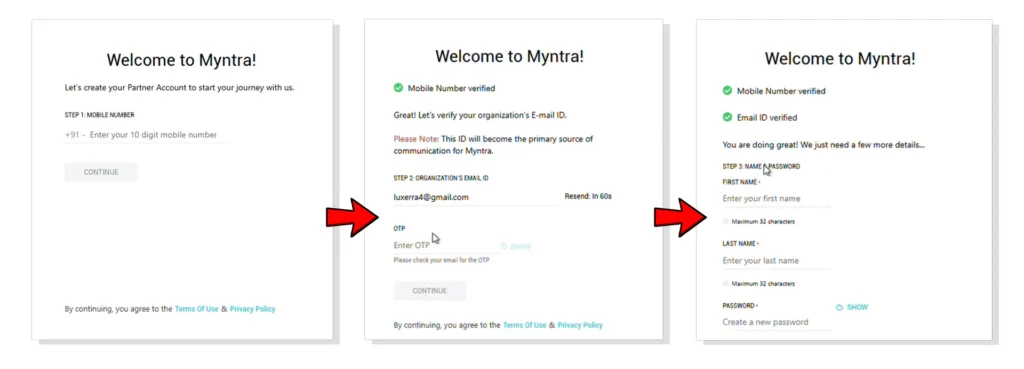
Enter your active mobile number and business email. You will receive OTPs on both. Verify each to proceed. Then set your account password and enter your first and last name.
Use your primary business email and a mobile number that is always accessible. All critical communications from Myntra, including approval status, policy updates and order notifications, will come to these contacts. Do not use a personal number that might change.
Step 2: GST Verification
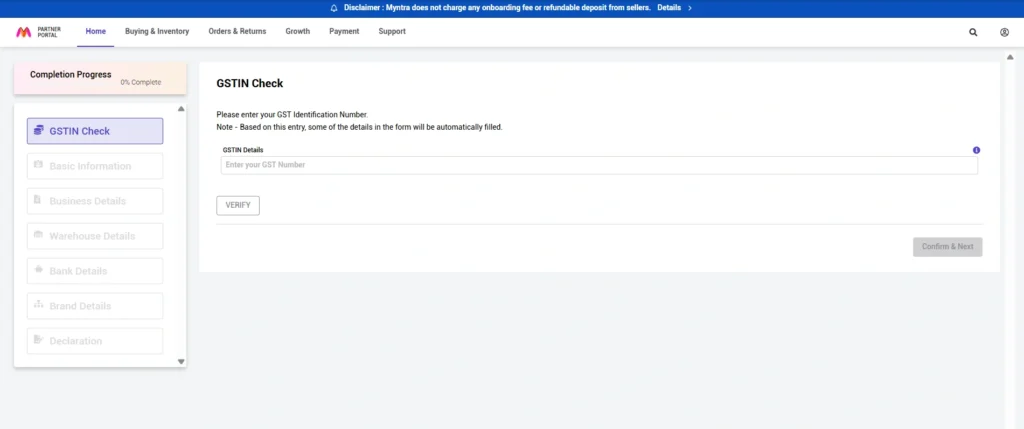
After logging in for the first time, the portal immediately asks for your GSTIN. The system validates your GST details automatically and populates your business name and address from GST records. Ensure your GST is active. Suspended or cancelled registrations cause immediate blocks on the application.
Step 3: Fill Business and Contact Details
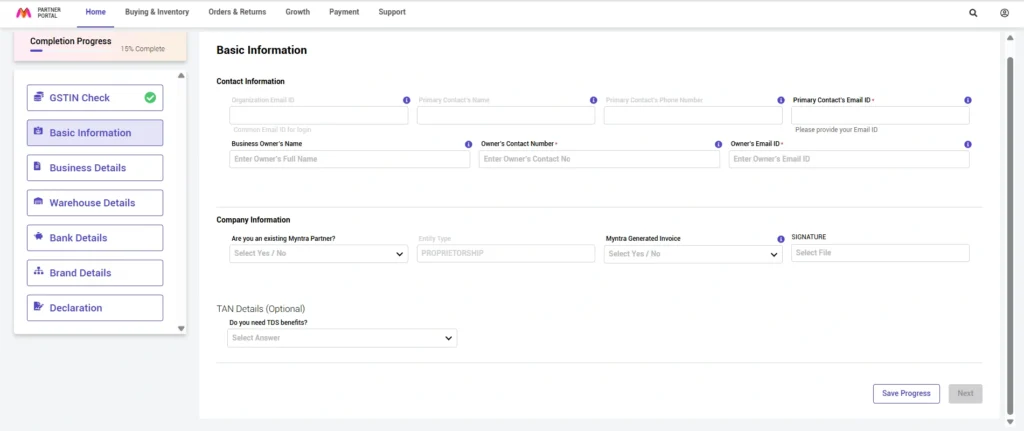
Complete two sections: contact information (mobile, email, secondary contact if needed) and company information (legal owner name as per GST registration, company type such as Proprietorship, Partnership, Private Limited or LLP, and signature).
Step 4: Choose Your Business Model
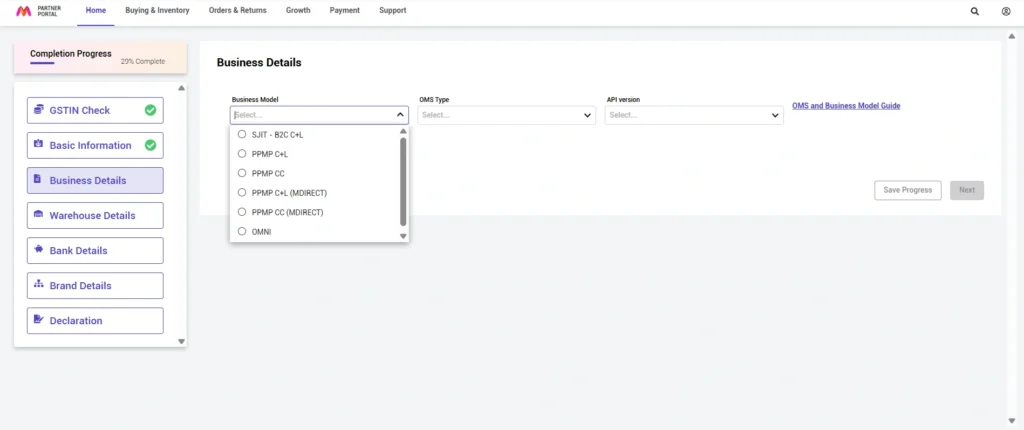
This step sets your operational model on Myntra. Available options are SJIT, PPMP C+L, PPMP CC, PPMP C+L MDirect, PPMP CC MDirect and Omnichannel. For first-time onboarding, select PPMP C+L. It is the default model, has the lowest entry barrier, and can be upgraded based on performance. Each model is explained in detail in the Seller Models section below. If you are a manufacturer interested in supplying product for Myntra's own brands, see the Private Label onboarding guide. That route operates outside the standard registration flow.
Step 5: Add Warehouse Details
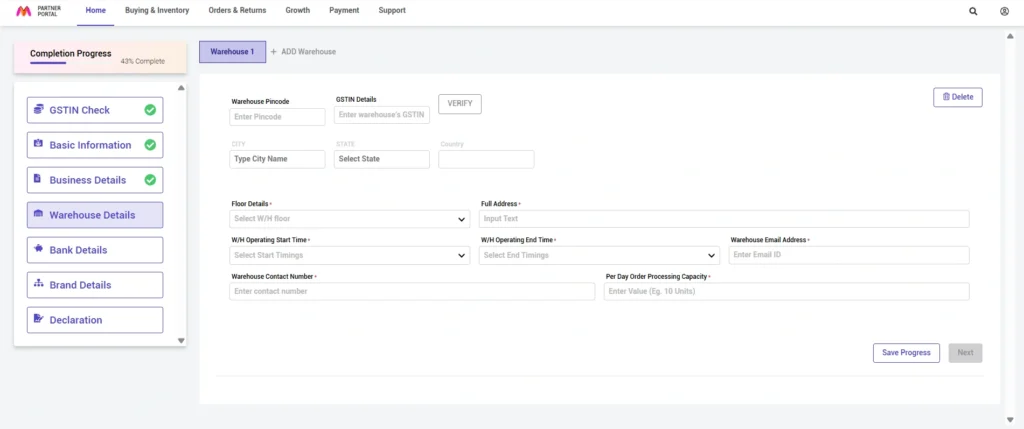
Required information: warehouse pin code, complete address with building name and area, operating timings, daily order processing capacity, and warehouse contact email and phone.
If you can genuinely process 50 orders per day, do not write 200. Overcommitting here causes fulfilment failures, delayed shipments and poor seller ratings that hurt your search visibility. Courier partners also schedule pickups based on your stated operating hours. Incorrect timings cause missed pickups.
Step 6: Bank Account Verification
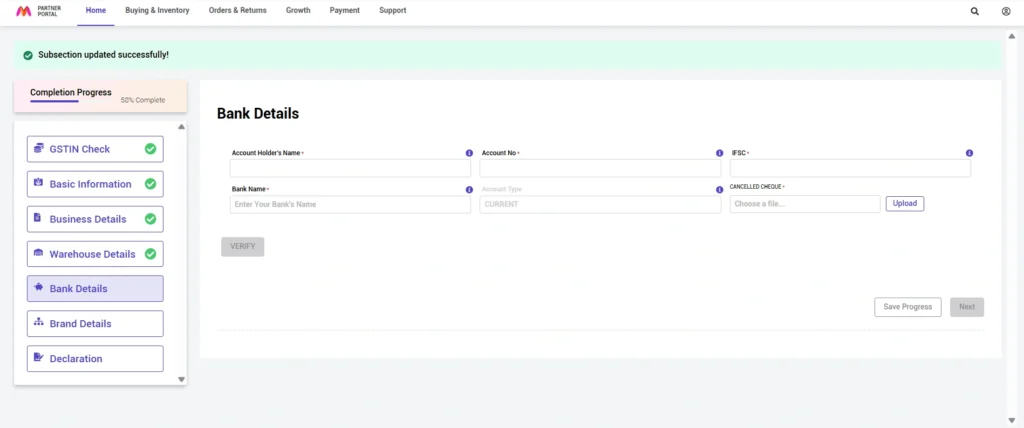
Enter account holder name exactly as it appears on bank records, account number, IFSC code and bank name. Upload a clear cancelled cheque in JPEG, PNG or PDF format. Myntra credits Rs 1 to 2 to your account to verify the details are correct. Monitor your bank statement for this amount.
Step 7: Complete Brand Details
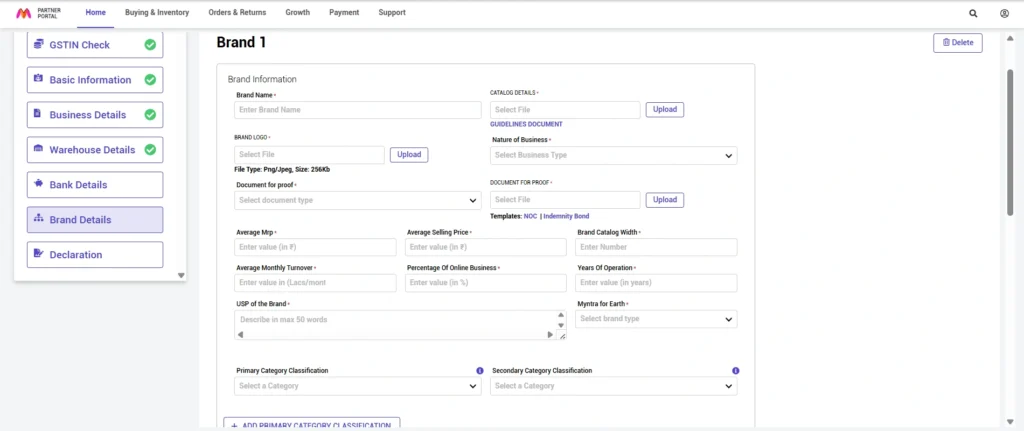
This section has the most direct impact on your approval outcome. It includes:
- Brand name and logo: logo in PNG or JPEG, maximum 256KB, clear resolution
- Catalog preview: at least one sample SKU image showing product quality and photography standard
- Nature of business: Brand Owner and Manufacturer, Distributor, Reseller, Brand Owner/Exporter/Importer, or Manufacturer (white-label)
- Trademark documentation: Trademark Registration Certificate if registered, or NOC/Indemnity Bond on company letterhead if not
The 50-word USP field directly influences approval. A strong USP communicates your target customer, quality differentiators, any certifications and your core value proposition with specifics. A weak USP says "good quality at affordable prices." Myntra reads this field during manual review.
Strong example: "Premium handcrafted ethnic wear for modern Indian women. 100% organic fabrics with traditional block printing from Jaipur artisans. Each piece undergoes 12-point quality check. Trusted by 50,000+ customers, 4.5-star average across platforms."
Step 8: Select Product Categories
Choose your primary category classification and a secondary category if your range spans multiple areas. Category selection determines where your products appear in Myntra's catalog structure and search filters. Choose carefully and accurately. Incorrect category mapping is one of the most common causes of delayed approval and is also a primary reason why Myntra products get rejected after the registration stage.
Step 9: Assortment Breakdown
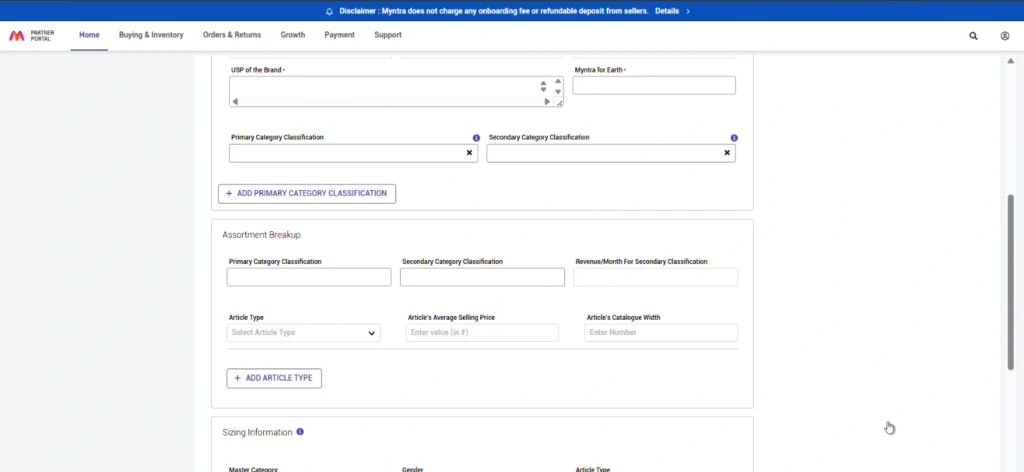
For each category, provide: expected monthly revenue, article type (Shirts, Kurtas, Dresses etc.), average selling price per article type, and catalog width (number of SKUs). If you sell both Shirts and T-shirts, add them as separate article types with their own details. This breakup tells Myntra your catalog depth and product mix, which influences how they evaluate brand fit.
Step 10: Sizing Information
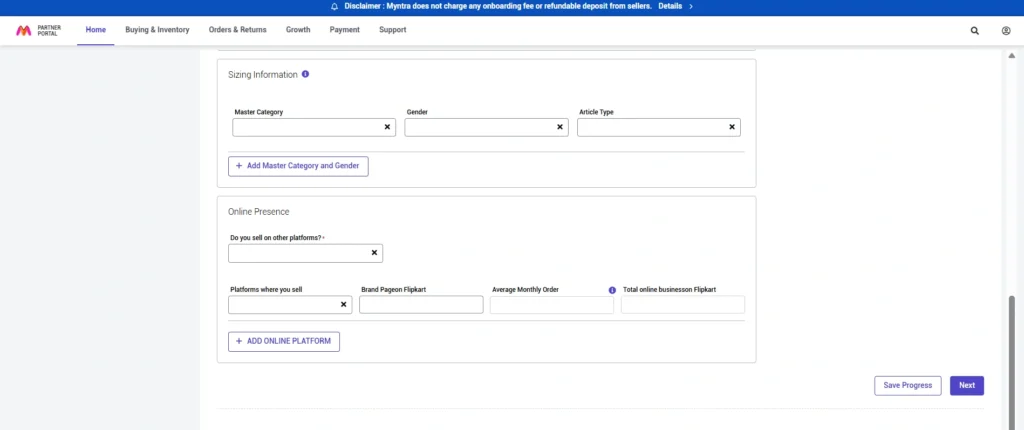
Select your master category, applicable gender (Men, Women, Unisex, Kids, Boys, Girls) and all article types from your assortment breakup. Ensure full consistency between this section, your category selection and your assortment data. Inconsistencies trigger manual review flags.
Step 11: Online Presence Disclosure
Myntra asks whether you are currently selling on other marketplaces. Selecting "No" significantly increases your rejection risk.
This field is how Myntra verifies that you have experience handling ecommerce operations, a proven sales track record, and products with demonstrated market demand. If you select "No," you remove the most important evidence Myntra uses to evaluate readiness. This is the exact reason Engee, CAO Jewels and House of Elora faced rejection in the case studies above. If you are not yet live on other platforms, use our Marketplace Onboarding Service to build that presence first.
If you select "Yes," provide your store link, monthly orders and monthly revenue for each active platform including Amazon, Flipkart, Meesho, Ajio, your own website, or others.
Step 12: Declaration and Submission
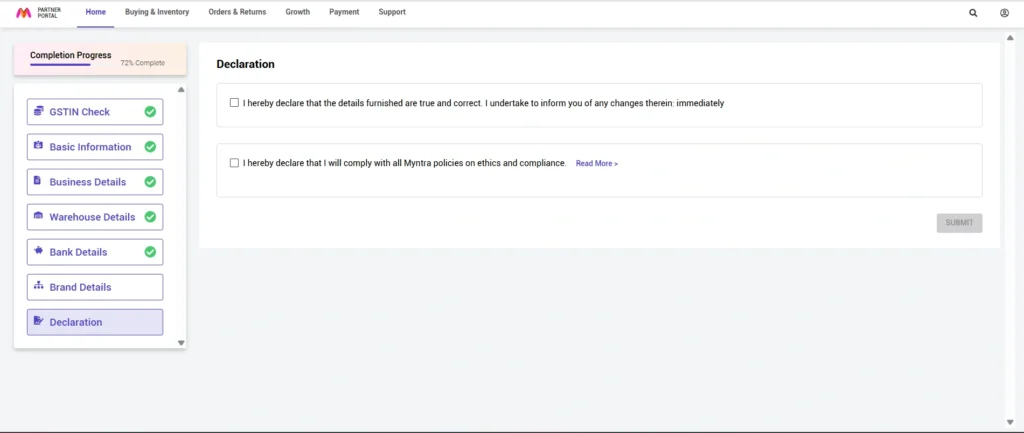
Before submitting, review every section. Verify all business details, confirm all documents are properly uploaded, check category and assortment data, and review your USP. Accept Myntra's seller policies and terms of service. After submission, you will receive a confirmation email. Save it for reference.
Step 13: Wait for Manual Review
Myntra manually reviews every application against their quality and brand standards. Expected timelines:
| Application Strength | Expected Timeline | Typical Profile |
|---|---|---|
| Strong | 15 to 30 days | Established brand with Amazon/Flipkart presence, complete documentation, strong USP |
| Average | 1 to 2 months | Complete application, moderate marketplace presence |
| Complex | 3 to 5 months | High-volume period, borderline eligibility, additional review needed |
| Weak | No response | Missing documentation, no marketplace presence, generic brand positioning |
Keep your registered email and phone accessible throughout this period. Myntra may request additional documentation or clarification. Repeated follow-up does not speed up the process.
Need Help Getting Approved on Myntra?
Our Myntra Onboarding Service covers the full registration, documentation review, catalog preparation and approval follow-through. Fill the form and we will review your brand's readiness within 24 hours.
Steps After Myntra Approval: How to Go Live
Approval from Myntra is the beginning, not the end. Going live requires a specific sequence of operational steps. Skip one and your first orders will either not arrive or not be fulfilled correctly.
- Accept the Seller Agreement: Log into the Partner Portal, review all terms and conditions, and accept the agreement to unlock further functionality.
- Category Approval if Needed: If you want to list in a category not selected during registration, raise a CTA (Category Approval) request with justification and sample products, and wait for approval before listing there.
- Start Product Listing: Begin listing with complete attributes, high-quality images at multiple angles, accurate sizing, materials and care instructions. Follow Myntra's image guidelines strictly. Read our Myntra product listing optimisation guide before uploading your first SKUs.
- Perform a Dry Run: Update inventory on one SKU, place a dummy order to activate your warehouse code, verify pin code serviceability, and confirm the full order flow from receipt to dispatch.
- Prepare Packing Materials: Myntra-compliant polybags, correct sizes for different product types, invoice printing configured, shipping label printer ready.
- Raise Your VMS Ticket: VMS (Vendor Management System) access provides complete operational control including order management, inventory tracking, returns and performance analytics. Raise this ticket in parallel with your first listings.
- Set Up Pricing: Use the Myntra Seller Pricing Calculator to factor in commission, logistics, returns and GST before setting your live prices. Pricing backwards from the settlement you need is the correct approach.
- Activate Advertising: After crossing Rs 70,000 in cumulative sales, you become eligible for sponsored listings, banner ads and category promotions.
Myntra Seller Models Explained
Which model you operate under determines your costs, operational responsibilities and growth path. Most sellers start on PPMP CL and may never need to change. Understanding all models, including the Myntra White Label programme and the Sale or Return (SOR) model for manufacturers, helps you plan properly. But most sellers start on PPMP CL and may never need to change. Before choosing your model, use the Myntra pricing calculator to model your margins under each structure.
PPMP CL: Commission Plus Logistics (Default for New Sellers)
You pay Myntra a commission (typically 15 to 25% depending on category) plus logistics costs. The customer pays the forward logistics fee. You calculate your bank settlement price by adding average return cost, product cost and desired margin, then quote this to Myntra. Myntra sets the final selling price displayed to customers.
Commission, logistics, collection/shipping charges, and returns together can reach 40% of your selling price. Always price backwards from the settlement you need, not forwards from your product cost. Use the Myntra Pricing Calculator to model this accurately before going live.
PPMP CC: Commission Only (Invitation-Based)
Not available at registration. Unlocked only after demonstrating strong sales performance and operational reliability. Under CC, you fulfil orders through Myntra's preferred logistics partners and pay only Myntra's commission (25 to 30% depending on category). You manage returns, with return charges still levied. Your overall cost is typically 20 to 30% lower than CL because you control logistics directly. Once unlocked, CL and CC can run simultaneously.
SJIT: Ship Just-in-Time
SJIT allows you to move inventory into Myntra's regional fulfilment centres closer to your demand hubs, even though the goods remain in your inventory. A Delhi-based seller with 50% of orders from Bengaluru can place stock in Myntra's Bengaluru FC, achieving 1 to 2 day delivery against 3 to 5 days from their own warehouse. Faster delivery improves product ranking and conversion rates. Sellers achieving 200 to 500 monthly orders become eligible for SJIT. See our guide on how to increase sales on Myntra for the full SJIT eligibility criteria and benefits.
Myntra can show the product's nearby location on the first search page, increasing visibility and purchase probability. Analyse your order geography before deciding which FC to target with SJIT inventory.
Myntra White Label: Sell Directly Under Myntra's Brand Profile
Myntra's white label programme is one of the most misunderstood entry routes on the platform. It is not a purchase order arrangement. When you participate as a white label manufacturer, you list and sell products directly through the Myntra platform, but under Myntra's own brand name, not yours. Your seller account is the operational vehicle, your inventory is what ships, and your fulfilment infrastructure handles despatch. The difference is the brand identity the customer sees: Myntra's label, not yours.
This distinction matters practically. You carry the inventory risk, you manage stock levels, and you absorb returns, just as you would under any standard PPMP model. What changes is that Myntra controls pricing, manages the brand's positioning on the platform, and markets the product under their private label. Your job is to manufacture to their specification, maintain catalogue continuity, and fulfil orders. The upside is placement under an already-trusted brand with existing platform visibility, which removes the cold-start problem that every new independent brand faces.
These are the in-house brands under which you would list and sell as a white label manufacturer partner. Each brand has defined category ownership, target customer and aesthetic brief:
- Roadster: Men's and women's casual wear; the highest-volume private label on the platform
- HERE&NOW: Fast-fashion drops and trend-led styles targeting Gen Z and young millennials
- Anouk: Women's ethnic and fusion wear: kurtas, dupattas, co-ord sets and occasion pieces
- House of Pataudi: Premium ethnic menswear co-created with Saif Ali Khan; higher price points and craftsmanship brief
- Mast & Harbour: Relaxed casual and weekend wear for men and women; linen, cotton and comfort-first construction
- Dressberry: Women's western wear: dresses, tops, jumpsuits and coordinates for everyday and occasion wear
- Invictus: Men's formal and smart-casual: shirts, trousers, blazers and suiting separates
- Kook N Keech: Pop-culture-driven casual wear; graphic tees, hoodies and streetwear for youth audiences
- Sztori: Women's plus-size and inclusive fashion; size range and fit accuracy are the primary brief criteria
- Crimsoune Club: Men's smart-casual and office wear; structured silhouettes at accessible price points
Who Qualifies: Production Capability Is the Gate
This programme is built for manufacturers, not resellers. Myntra is evaluating whether your factory can consistently produce to brief, at volume, on schedule. Brand equity and social presence, the metrics that matter for independent seller approval,are largely irrelevant here. What matters is your production infrastructure and your catalogue track record. Specific criteria:
- Marketplace selling experience required, Myntra experience not: You do not need an existing Myntra seller account. But you must be actively selling on at least one other marketplace, specifically Amazon, Flipkart, Meesho, Ajio or Nykaa, to demonstrate that you can operate at ecommerce pace and scale.
- Minimum 100+ live SKUs on any platform: This is the baseline signal that you can maintain catalogue width. It tells Myntra that your production is not batch-limited to a handful of styles.
- Demonstrated capacity for 50+ new SKUs per season: You need to be able to develop and deliver fresh product to Myntra's seasonal brief, not just repeat existing styles. This is a hard floor, not a preference.
- Documentation mirrors the standard registration pack: Active GSTIN, PAN card, Trademark Registration Certificate or NOC on company letterhead, cancelled cheque, and product samples. The same documents required for the standard 13-step Myntra seller registration apply here.
How You Get In: The Internal Contact Requirement
There is no self-serve application route for white label onboarding. The Partner Portal does not have a white label programme tab. Access begins with an internal Myntra contact, specifically a category manager or sourcing account manager,who can initiate the process from Myntra's side.
The manufacturers Myntra prioritises for white label partnerships are those already selling on Myntra under their own brand with strong quality metrics and reliable fulfilment. If your account shows consistent catalogue quality, low return rates and high despatch compliance, Myntra's category teams will surface you internally. Being a performing Myntra seller is the highest-probability path to a white label invitation. If you are not yet a seller, the next best route is through an established Myntra onboarding partner with direct access to category team contacts. Cold outreach to Myntra's public support channels does not reach the sourcing teams.
What It Costs to Participate
The cost structure for white label selling is similar to standard Myntra selling, with two additional fixed costs that are unique to this programme:
| Cost Component | Rate | What to Know |
|---|---|---|
| Platform Commission | Category and price band dependent | Identical rate structure to standard selling. Ethnic apparel under Rs 900 attracts 2%; above Rs 900, 15%. See the complete Myntra commission table by category for your specific rate. |
| Fixed Forward Shipping | Under Rs 99 per order | Predictable per-order logistics cost. Does not vary by zone for the fixed tier. |
| Return Logistics | Under Rs 99 per return | You bear the return cost. Apparel returns on Myntra average 25 to 35%, so model this carefully against your margin. |
| Mandatory Ad Spend (PLA) | Pay Rs 25,000, receive Rs 30,000 in PLA credits | You pay Rs 25,000 directly to Myntra. Myntra credits your account with Rs 30,000 in Product Listing Advertisement inventory. The credit is platform ad spend, not cash, and must be deployed on the platform. This is a programme entry requirement, not optional. |
| Annual Licence Fee | Rs 15,000 to Rs 30,000 per year | Charged for the right to operate under Myntra's white label brands. Renewed annually. Rate varies by category and the specific brand label you are manufacturing for. |
The licence fee and mandatory ad spend are fixed costs that land before your first sale. At Rs 15,000 to Rs 30,000 in licence fees plus Rs 25,000 in ad spend, your minimum entry cost is Rs 40,000 to Rs 55,000 before commission and logistics. The Rs 30,000 PLA credit partially offsets this, but it is platform advertising credit not cash. Use the Myntra pricing calculator to determine the sales volume at which your unit economics turn positive, and validate that your production capacity can reach that threshold within the licence year.
Myntra SOR: Sale or Return Model
The Sale or Return model is categorically different from white label selling in one fundamental respect: inventory ownership changes hands upfront. Under SOR, Myntra raises a formal purchase order against your catalogue. You fulfil that PO, which means physically transferring stock to Myntra's fulfilment infrastructure. At that point, Myntra owns the inventory. They price it, market it, and sell it. If it sells, you receive the agreed supply price. If it does not sell within the agreed window, Myntra returns the unsold stock to you.
This structure appeals to manufacturers who want confirmed, forward demand rather than the uncertainty of selling on consignment. The trade-off is the return clause. Unsold inventory comes back, so you need both the production capacity to supply and the absorption capacity to take back stock that does not move. SOR is not a risk-free wholesale arrangement; it is a demand-contingent one.
Under white label, you retain inventory until it sells. You list under Myntra's brand, you fulfil orders, you carry the stock risk throughout. Under SOR, Myntra raises a purchase order. Inventory moves to Myntra's control on PO fulfillment. Myntra carries the selling responsibility. Unsold stock reverts to you at the end of the sale window. The cash flow, risk profile and operational model are materially different between the two.
How SOR Works in Practice
Once Myntra's buying team identifies your catalogue as a fit for their seasonal or category requirement, they issue a purchase order specifying styles, quantities, sizes and delivery dates. You manufacture and despatch to the nominated Myntra warehouse or FC. From that point, Myntra handles all platform operations: listing, pricing, promotions, customer fulfilment and returns management.
Your operational touchpoints under SOR are limited to two stages: PO fulfilment on the front end, and receiving returned stock at the back end if inventory is not liquidated within the agreed period. Settlement is based on sell-through against the PO value, less any agreed deductions. Unlike the PPMP commission model where settlement is per order, SOR settlement is typically periodic against the PO.
Who SOR Is Suited For
SOR is the right model if your business fits a specific operational profile. It rewards manufacturers who have high production efficiency (since you are fulfilling against a committed PO, not estimating demand), strong returns absorption (since unsold stock comes back), and the financial structure to bridge the gap between production cost and settlement timing. It is not suited to brands that are inventory-light or cannot absorb returned stock without disruption to their production cycle.
- Established manufacturers with proven category relevance to one of Myntra's existing private label briefs
- Businesses with warehousing capacity to absorb potential returns at the end of a sale window
- Producers who can deliver on tight PO timelines. Myntra's buying calendar is seasonal and does not accommodate late supply
- Manufacturers already in Myntra's supplier ecosystem, typically through an existing white label or PPMP relationship, who have earned buying team confidence
Like white label onboarding, SOR arrangements are initiated by Myntra's buying team, not by seller application. Myntra identifies production partners based on catalogue fit, quality history and capacity signals from existing relationships on the platform. If you are already selling on Myntra and have built a track record of quality and fulfilment consistency, you create the conditions for a buying team conversation. For manufacturers without an existing Myntra presence, building that foundation first, either through standard Myntra seller registration or through a managed onboarding partnership, is the prerequisite.
Exploring White Label or SOR on Myntra?
Both programmes require an internal Myntra contact to initiate. If you are a manufacturer with 100+ active SKUs and capacity for 50+ new styles per season, our team can assess your fit and connect you with the right Myntra contacts. Fill the form below and we will come back within 24 hours.
Omnichannel: Myntra Seller Model for Offline-Online Brands
For established brands selling both online and offline. Your offline store inventory and online inventory are connected through one order management system. Orders from Myntra can be fulfilled from any available location, your warehouse or retail stores, optimising delivery speed and cost. Best suited for brands like TCNS or Lifestyle that already have an offline retail footprint and want to maximise existing inventory without additional warehouses.
Myntra LUX: Premium and Luxury Brand Seller Model
Designed for premium and luxury brands with products typically priced above Rs 10,000. Operates on a make-to-order basis, minimising inventory risk. Products are showcased in a dedicated premium section of Myntra. Eligibility requires demonstrated brand positioning and product quality that meets Myntra's luxury standards.
Myntra Commission Rates by Category: 2026
Myntra does not charge a flat commission. The rate you pay depends on your product category and the price band your product falls into. Pricing your products on Myntra the same way you price on Amazon or Flipkart and expecting the same settlement is the single most common margin error brands make after approval. This applies whether you are selling under your own brand on PPMP CL or CC, or supplying product as a Myntra private label manufacturer. Use our free Myntra seller pricing calculator to model your exact net settlement before setting any live prices.
Commission rates listed here are indicative figures verified from direct experience managing seller accounts. Your exact confirmed rate will be in your seller agreement inside the Myntra Partner Portal (VMS). Always check this before setting live prices. For a comparison of commission structures across platforms, see our marketplace pricing calculator guide.
Ethnic Apparel: The Most Important Pricing Cliff on Myntra
| Seller Listing Price | Commission Rate | Margin Impact |
|---|---|---|
| Up to Rs 900 | 2% | Exceptionally low. Myntra's biggest incentive for ethnic wear |
| Above Rs 900 | 15% | Significant jump. 13 percentage-point difference at one rupee threshold |
At 2% below Rs 900 and 15% above it, this is the sharpest pricing cliff on Myntra. A kurta priced at Rs 901 costs you 13 percentage points more in commission than a kurta at Rs 899. If you sell ethnic wear anywhere near this threshold, model both sides before fixing your MRP using the Myntra pricing calculator.
Footwear: Myntra Commission Rates
| Seller Listing Price | Commission Rate | Margin Impact |
|---|---|---|
| Up to Rs 500 | 8% | Low. Workable on volume |
| Rs 501 to Rs 1,000 | 15% | Moderate. Build into MRP |
| Above Rs 1,000 | 20% | High. Price carefully |
If your footwear is priced near the Rs 1,000 mark, model both sides of the threshold. A Rs 2 difference in listing price can cost you 5 commission points on every order.
Jewellery and Accessories: Myntra Commission Rates
| Seller Listing Price | Commission Rate | Margin Impact |
|---|---|---|
| Up to Rs 300 | 10% | Manageable for fashion jewellery |
| Rs 301 to Rs 500 | 12% | Moderate. Watch return rates in this category |
| Above Rs 500 | 20% | Premium ASP essential to stay profitable |
Apparel: Western, Men's and Kids' (Non-Ethnic)
| Seller Listing Price | Commission Rate | Margin Impact |
|---|---|---|
| Up to Rs 900 | 4% | Strong entry point for casual wear brands |
| Rs 901 to Rs 1,000 | 7% | Mid-range. Comfortable margin band |
| Above Rs 1,000 | 15% | Premium apparel. Factor into MRP carefully |
Home Furnishing and Decor: The Only Zero-Commission Band on Myntra
| Seller Listing Price | Commission Rate | Margin Impact |
|---|---|---|
| Up to Rs 500 | 0% | Zero commission. The only such band on the platform |
| Rs 501 to Rs 1,000 | 4% | Very low. Highly profitable band |
| Rs 1,001 to Rs 2,000 | 6% | Low. Solid margin potential |
| Above Rs 2,000 | 16% | High. Premium sets need careful pricing |
Home furnishing products priced under Rs 500 pay zero commission on Myntra. For brands with lifestyle accessories, gifting products or small decor items at this price, the economics can be genuinely strong. Forward logistics costs still apply per shipment.
Your Complete Myntra Cost Stack
| Fee Type | Typical Range | What Drives It |
|---|---|---|
| Platform Commission | 0% to 30% | Category and price band (see tables above) |
| Forward Logistics | Rs 55 to Rs 120 per order | Product weight, size and delivery zone |
| Return Logistics | Rs 55 to Rs 120 per return | Apparel returns average 25 to 35% |
| Collection Charge | 1% to 2% | Payment processing on order value |
| GST on Myntra Fees | 18% on fees | Charged on commission and logistics amounts |
| Effective Total Deduction | 30% to 40% | Of selling price across most apparel categories |
Plan for a total effective deduction of 30 to 40% of your selling price across most apparel categories. Your bank settlement is typically 60 to 70% of your listed MRP before your own product cost. Use the Myntra Seller Pricing Calculator to model your exact economics before setting live prices. For a cross-platform comparison, see our marketplace pricing guide covering Amazon, Flipkart and Myntra side by side.
Myntra Seller Fees: What You Actually Pay in 2026
The question sellers most frequently ask after commission rates is: what are all the fees I actually pay on Myntra? The answer is that Myntra charges across four distinct cost lines, not just commission. Understanding each one separately prevents the margin surprise that hits most new sellers in their first settlement cycle. Use the Myntra pricing calculator to calculate your exact net settlement after all fees for any product and price point.
1. Platform Commission (Variable)
The percentage of your selling price that Myntra retains as its marketplace fee. This is category-specific and price-band-specific. It is the largest single fee component for most sellers. The full breakdown by category is in the commission rates section above. The key point: never set your MRP without knowing which commission band your product falls into. A single rupee difference in price can shift you from a 2% to a 15% commission band in ethnic apparel.
2. Logistics Fee (Per Order)
Myntra charges a forward shipping fee per order despatched under the PPMP CL model. The rate is based on product weight, package dimensions and the delivery zone. For most standard apparel, this runs Rs 55 to Rs 120 per forward shipment. This fee is separate from commission and is charged on top of it.
3. Return Logistics Fee (Per Return)
When a customer returns an order, you pay a return logistics fee regardless of the reason for return. At an average apparel return rate of 25 to 35% on Myntra, this is a material cost line that many sellers underprice around. The return fee is typically comparable to the forward logistics fee: Rs 55 to Rs 120 per return shipment.
4. Collection Charge and GST on Fees
Myntra levies a collection charge of 1 to 2% of the order value for payment processing, and charges 18% GST on all platform fees, meaning commission, logistics and collection charge all attract GST on top of their base rate. This GST is an additional cost to your P&L, not a pass-through.
Amazon and Flipkart have different fee structures, different return rate norms and different logistics arrangements. Brands that assume Myntra margins will mirror their Amazon margins typically discover a 10 to 15 percentage point gap on first settlement. Always model Myntra fees independently using the Myntra pricing calculator rather than extrapolating from other platforms. Our cross-platform pricing guide shows the exact differences side by side.
How to Increase Sales on Myntra: Proven Strategies
Getting approved and going live is the easy part. Building consistent, profitable sales on Myntra requires sustained effort across listing quality, inventory management, pricing and advertising. For a deeper treatment of promotion strategy, sale calendar planning and the 8 most costly mistakes sellers make, read our full guide on how to increase sales on Myntra. The strategies below cover the day-to-day operational foundation.
Listing Optimisation: The Foundation
Product Titles
Your title is both the first thing customers see and a primary ranking signal in Myntra's search algorithm. Include the primary search term, brand, colour, material, style and product type. Avoid keyword stuffing. It reduces click-through rates and eventually hurts rankings. For a full breakdown of title strategy, backend keyword optimisation and the grouping techniques most sellers miss, read our Myntra product listing optimisation guide.
Strong example: "Women's Navy Blue Solid Cotton Blend A-Line Kurta with Embroidered Yoke"
Product Descriptions
Descriptions serve two functions: helping customers decide, and giving keyword signals to the algorithm. Include key features, material composition, fit and sizing, care instructions, styling suggestions and occasion suitability. Structure with bullet points for mobile readability. The majority of Myntra shoppers browse on mobile.
Images
Images are the most influential purchase driver on Myntra. Poor images lead directly to low click-through rates and high return rates. See the detailed photography guidance in our listing optimisation guide for how top-performing brands structure their image galleries.
- Minimum 1000px width, high resolution
- Multiple angles: front, back, side, close-up detail
- Consistent white background for main product image
- Lifestyle shots showing real-world context
- Accurate colour representation. Inaccurate colour is the leading cause of returns
Sales Growth Tactics
Launch New Products Regularly
Myntra's algorithm rewards freshness. Brands that add new products consistently get better visibility in search and "New Arrivals" sections. Target 5 to 10 new styles per month, timed around seasonal trends and festivals. Monitor which new products gain early traction and build on them. Our Myntra account management service covers new product launch strategy as part of monthly operations.
Pricing for Myntra's Audience
Myntra customers are discount-aware and price-sensitive. Myntra's algorithm also factors price competitiveness into search rankings. Overpriced products lose visibility even with strong reviews. Research competitor pricing for similar products and use psychological price points (Rs 999 versus Rs 1,000). Factor in the full cost stack before setting your MRP. See the commission tables above and use the pricing calculator to verify your margins.
Festival and Seasonal Planning
Myntra Algorithm Ranking Factors
Myntra's search algorithm considers performance metrics, catalog quality and operational signals together. These four metrics directly control your search position and are tracked in depth in our Myntra account management reporting.
Click-Through Rate
Clicks divided by impressions. Indicates whether your title and main image are compelling enough to draw shoppers in from search results. Low CTR almost always traces back to weak imagery or an unclear title.
Conversion Rate
Purchases divided by product views. Reflects how well your listing persuades buyers once they arrive. Low conversion with high views means your description, images or pricing need work. See the listing optimisation guide for specific fixes.
Return Rate
Returns divided by orders. Apparel returns average 25 to 35% on Myntra. High return rates hurt both rankings and profitability. Most returns trace back to inaccurate colour representation or sizing errors.
Inventory Availability
Products that go out of stock lose their ranking position. When you restock, you start from scratch in terms of visibility. Maintain 2 to 3 weeks of buffer stock on best-sellers at all times.
Advertising on Myntra
Once you cross Rs 70,000 in cumulative sales, you become eligible for Myntra's advertising platform. Available formats include Sponsored Products (appear in search results), Banner Ads (category and homepage placement) and Brand Store Ads (driving traffic to your brand page).
Start with small budgets to test performance, focus spend on high-margin products with proven organic traction, and monitor ROAS weekly. Increase budgets during sale events when platform traffic and conversion intent are highest. Enrolling for EORS and other promotions should happen 2 to 3 weeks before the event. Building your ad history 2 to 3 months in advance of major sales significantly improves algorithm performance during the events themselves.
Myntra Rising Star and MNow
Rising Star is Myntra's program for promising new brands with strong unique catalogs, high-quality imagery and positive early metrics. Benefits include a dedicated account manager, priority category visibility and access to exclusive promotions. The Myntra pricing calculator includes a Rising Star model toggle so you can model the economics during this zero-commission introductory period.
MNow enables 30-minute delivery in select cities during peak seasons by placing inventory in Myntra's hyperlocal fulfilment centres. Products with the "30-min delivery" badge see significantly higher conversion rates during festivals like Durga Puja.
Myntra Seller Operations: Daily, Weekly and Monthly Checklist
The sellers who build durable positions on Myntra treat these tasks as non-negotiable operating rhythms, not occasional activities. Our Myntra account management service covers all of the below on behalf of brands who prefer to focus on product and growth rather than day-to-day platform operations.
Daily Seller Tasks on Myntra
- Check and update inventory levels, particularly for fast-moving SKUs
- Process and dispatch pending orders within committed timelines
- Respond to customer queries and reviews
- Monitor order fulfilment status for any exceptions
Weekly Seller Tasks on Myntra
- Analyse sales performance at SKU level. Identify gainers and decliners
- Check stock levels for fast-moving items and raise purchase orders if needed
- Review new customer reviews and respond professionally to negative ones
- Monitor advertising campaign performance and adjust bids
- Check return reasons. Pattern recognition on returns informs listing improvements
Monthly Seller Tasks on Myntra
- Launch new products. Minimum 5 to 10 new styles
- Review product performance analytics in depth. Categorise SKUs by visibility and sales
- Optimise underperforming listings. Imagery, descriptions, pricing or attributes
- Clear slow-moving inventory through targeted discounts or bundles before it becomes dead stock
- Plan inventory and promotions for upcoming festivals and seasons
- Review and adjust advertising strategy based on ROAS data
Common Mistakes Myntra Sellers Make
The sellers who plateau or decline on Myntra are almost always making one or more of these errors. For issues specific to product uploads and catalog rejections, read the dedicated guide on why Myntra products get rejected and how to fix them.
Myntra's filters rely entirely on product attributes. A missing size, colour, material or occasion attribute means your product is invisible to shoppers using those filters. Fill 100% of product attributes at listing creation, not later. This is also one of the primary causes of silent product rejections after upload.
Slow inventory updates cause cancellations. Cancellations damage seller ratings. Damaged seller ratings reduce search visibility. This is a compounding problem. Update inventory in real time or at minimum twice daily.
Negative reviews left without a response damage both visibility and customer trust. Thank positive reviews and address negative ones professionally. Myntra's algorithm reads seller responsiveness as a quality signal.
Most sellers optimise at launch and never look again. Review listing performance monthly. When data shows low CTR, the problem is likely the main image or title. When data shows low conversion with decent CTR, the problem is the description, secondary images or pricing. Read our listing optimisation guide for the exact fixes by symptom.
High return rates destroy profitability and ranking simultaneously. Use accurate size charts, clean colour-accurate images and detailed descriptions. Most returns are preventable at the listing level. For sale events, managing return rates during the promotional window is especially critical as high-velocity returns compound quickly.
Frequently Asked Questions: Selling on Myntra
Selling on Myntra: What Separates Brands That Grow
Myntra rewards preparation and consistency above everything else. The brands that build durable, profitable positions on the platform share a few common traits: they entered with their documentation and catalog in order, they understood their cost structure before setting prices, they invested in listing quality rather than taking shortcuts, and they treated performance data as an operating input rather than a monthly report.
The registration process is a filter, not a formality. The sellers who treat it that way, preparing properly rather than rushing through, have significantly better approval rates and launch outcomes than those who do not. After approval, the work of growing sales on Myntra begins in earnest. Both stages require the same discipline: execution, not shortcuts.
If you want support with the registration process, catalog preparation or ongoing Myntra account management, the form below connects you directly with our team. Manufacturers exploring the Myntra white label programme or the SOR model can reach out through the same form. We have also onboarded brands across all major Indian marketplaces including Amazon, Flipkart, Blinkit, Zepto and Nykaa.
Ready to Sell on Myntra? Talk to Our Team.
We have managed Myntra onboarding and account management for 300+ brands. Use the form below. We will review your brand's readiness and come back within 24 hours.