
Over 70% of Flipkart's first-page results in competitive categories are now paid placements. If you are a seller relying entirely on organic ranking to drive sales, you are fighting with one hand tied behind your back. This flipkart advertising guide 2026 is written for sellers who already have live listings and want to grow volume through ads without burning through their margins.
Flipkart's ad platform has matured significantly. What used to be a simple "boost your product" button has grown into a multi-format system with keyword targeting, placement-level bidding, contextual display units, and Smart ROI automation. Knowing which format to use, when to use it, and how much to bid is the difference between a 6x ROI and a campaign that drains your wallet with zero visibility into why.
This guide covers every ad type, actual cost ranges, campaign setup, keyword strategy, bid management, and reporting, all in plain language that sellers managing their own accounts can act on immediately.
Flipkart Ad Types at a Glance - 2026
| Ad Type | Description |
|---|---|
| Product Listing Ads (PLA) | CPC-based ads that appear in search results, homepage, product pages, and browse pages. Best for direct sales. |
| Product Contextual Ads (PCA) | Rich media units shown on product detail pages and search pages, targeting buyers already browsing related products. |
| Display Ads | Large banner placements across the homepage and category pages. Used for brand launches and festive season visibility. |
| Smart ROI (within PLA) | Algorithm-managed campaign where you set a target ROI and Flipkart's system controls bidding. Best for established products with sales history. |
| Brand Store / Shelf Ads | Dedicated brand page on Flipkart. Available to registered brands. Supports consideration and repeat purchase. |
What is Flipkart Advertising and How Does It Work
Flipkart Advertising is the platform's in-built retail media system that lets sellers pay to place their products in front of buyers who are actively searching or browsing. You access it directly through your Seller Hub account under the "Ads" tab. No separate agency account is needed to get started.
The core principle is straightforward. When a buyer searches for "running shoes size 10" on Flipkart, the platform runs a real-time auction among all eligible advertisers targeting that keyword. The winner is not simply the highest bidder. Flipkart's algorithm weighs your bid against your listing's quality score, which includes factors like product rating, number of reviews, catalogue completeness, images, and your product's historical conversion rate. A listing with 200 reviews, 4.2-star rating, and seven images will win placements at a lower CPC than a competing listing with two images and no reviews, even if the competitor bids higher.
This matters practically. Before you spend a single rupee on ads, your listings need to be clean. Seven or more images showing the product from multiple angles, a keyword-rich title, accurate bullet points, and at least 15 reviews are the baseline for competitive ad placements. In our experience managing Flipkart seller accounts, sellers who run ads on under-optimised listings typically see CTR below 0.5% and conversion rates below 1%, making any ROI target impossible to hit.
Flipkart charges you only when a buyer clicks your ad, not per impression. Your daily or total campaign budget controls how much you can spend. Once the budget is exhausted, your ads stop showing until the next day or you add more funds. You can track spend, clicks, revenue, and ROI from the Flipkart Ads dashboard, which updates three times a day.
You do not need to be a brand-registered seller to run PLA campaigns. Any active seller with live, in-stock listings is eligible within 48 hours of listing approval.
Before setting ad budgets, understand your actual cost structure. Use the Flipkart seller price calculator to verify that your margins can absorb ad spend at your target ROI.
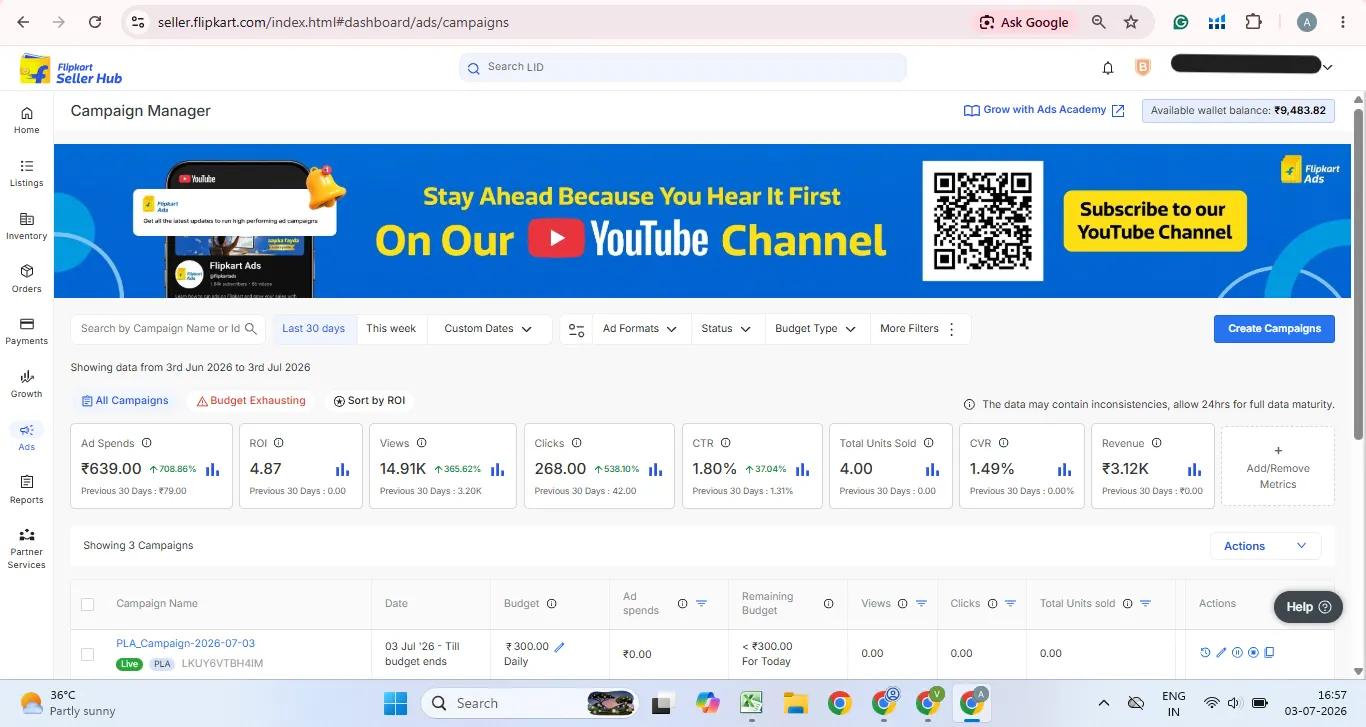
Types of Flipkart Ads Explained: PLA, PCA, Display, and Brand Store
Flipkart currently offers four main advertising formats. Understanding what each one does, and what it is not designed for, will save you significant money.
Product Listing Ads (PLA) are the workhorse of Flipkart seller advertising. They appear in six placements: the home page, the top of search results (slot 1), the rest of search results, product pages (below the Add to Cart button), browse and category listing pages. PLAs run on a CPC model.
You can target via Exact Match or Phrase Match keywords, with a maximum of 200 keywords per campaign. Within PLA, you can choose between two campaign types. CPC campaigns give you manual control over bids and are best when you want visibility on specific keywords. Smart ROI campaigns hand bidding to Flipkart's algorithm, which optimises for a target ROI you set. Smart ROI runs only on a total budget, not a daily budget, and is only available to sellers (not vendors).
The system suggests which products to include using five options: ROI Booster for your best sellers, New Listing Visibility for recently launched products, Move Slow Inventory for products with lower turnover, Beat Competition for listings with strong category potential, and Custom Selection where you pick specific products manually.
Product Contextual Ads (PCA) are shown on search pages and product detail pages, targeting buyers based on their browsing behaviour and the context of the page they are on. If a buyer is looking at a competitor's smartphone case, your PCA ad for a similar product can appear on that same page. PCA is sometimes referred to informally as "Product Boost Ads" or PBA by sellers in the market, though Flipkart's official terminology is PCA. These ads run on CPC and use either a daily or total budget. They are visible on mobile only, which is significant since the vast majority of Flipkart's traffic comes from the app. PCA is not a replacement for PLA. It is a complementary format that extends your reach into consideration-stage buying moments.
Some sellers and third-party guides refer to PCA as PBA (Product Boost Ads). Both terms refer to the same Flipkart ad format. Flipkart's official name is PCA. You will see PBA used on seller forums and in some agency content, but when you open your Seller Hub, the option will appear as PCA.
Display Ads are full-width banner placements shown on the Flipkart homepage, category pages, and across the app. They require a creative upload and are subject to Flipkart's approval process. Display campaigns are not always available to all sellers and typically require minimum spend commitments. These are better suited to brand launches, Big Billion Days, and festive season pushes than to everyday performance campaigns.
Brand Store is a dedicated page within Flipkart where registered brands can curate their full product portfolio, brand story, and seasonal collections. Brand Store ads drive traffic from within Flipkart to this page. Available only to sellers enrolled in Flipkart's brand protection programme.
| Format | Where It Appears | Pricing Model | Best For |
|---|---|---|---|
| PLA (CPC) | Search, Home, Product Page, Browse | Cost Per Click | Direct sales, keyword targeting |
| PLA (Smart ROI) | Same as above | Algorithm-managed | Scaling proven products |
| PCA | Search page, Product detail page (mobile) | Cost Per Click | Cross-sell, contextual reach |
| Display Ads | Homepage, Category page | CPM / Fixed | Brand launches, festive events |
| Brand Store Ads | Platform-wide traffic to Brand Store | CPC | Brand building, portfolio discovery |
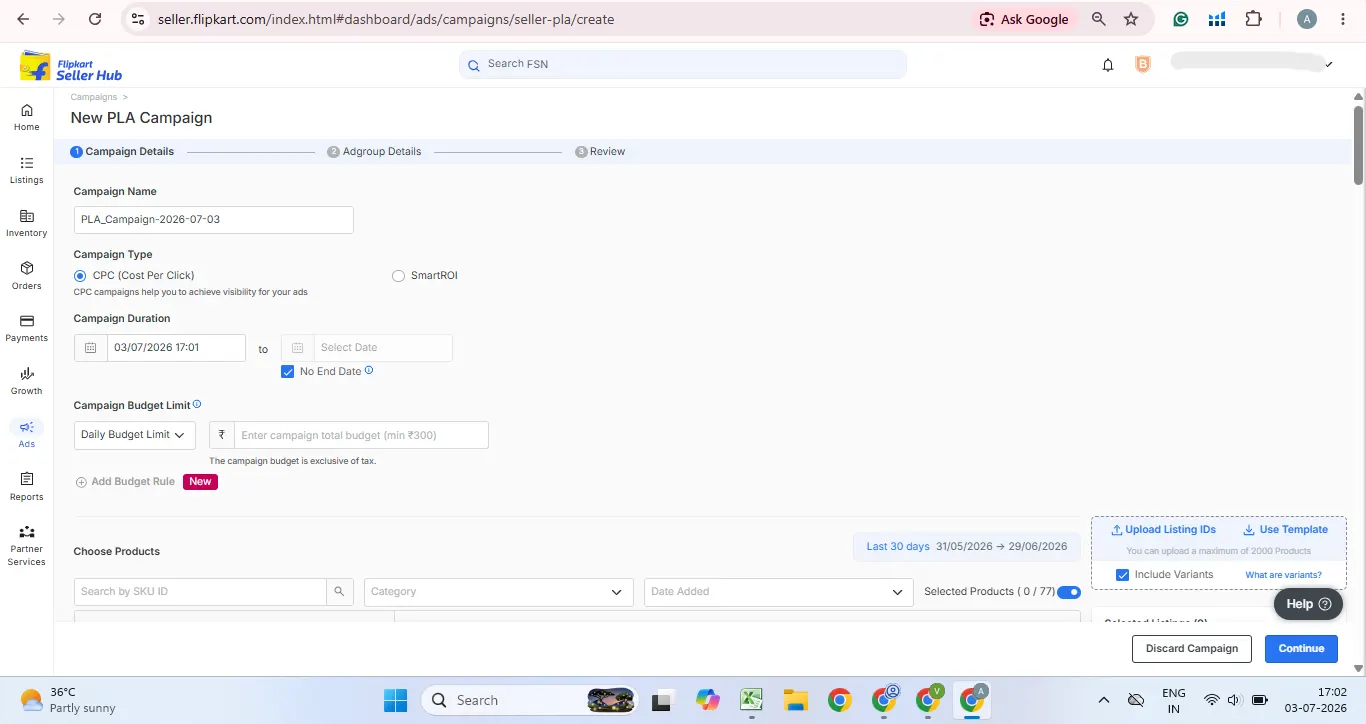
Flipkart Advertising Cost and PPC Rates in 2026
This is the question every seller asks before starting, and it is also the one with the most variation. Flipkart advertising cost depends on your category, competition level, listing quality, and match type. There is no single fixed price.
For PLA campaigns on a CPC basis, the typical range for most product categories in India sits between Rs. 1 and Rs. 5 per click. Electronics, mobile accessories, and fashion see CPCs at the lower end because of high search volume and available inventory. Competitive categories like home appliances, fitness equipment, and beauty products can push CPCs to Rs. 5 to Rs. 10 during sale periods. Categories with low search volume and little competition sometimes see CPCs below Rs. 2.
The minimum daily budget for a Flipkart PLA campaign is Rs. 300, but this is just the platform floor, not a workable number. At Rs. 300 per day with an average CPC of Rs. 3, you are getting roughly 90 to 100 clicks daily. That sounds reasonable on paper, but it gives you almost nothing to optimise with once you split it across keywords. In practice, any campaign you want meaningful data from within two weeks needs a minimum of Rs. 500 to Rs. 600 per day. A realistic starting budget for a seller testing three to four products is Rs. 300 to Rs. 500 per day total across campaigns.
For Smart ROI campaigns, you set a target ROI (for example, 10x means Rs. 1000 in sales for every Rs. 100 spent on ads) and Flipkart's system controls the rest. If your target ROI is set too high, the system will underspend because it cannot find enough qualifying clicks at that efficiency. Most sellers find that setting Smart ROI between 7x and 8x in moderately competitive categories gives the algorithm enough room to spend meaningfully without burning budget on low-intent traffic.
A good ROI benchmark for Flipkart ads varies by category and margin. If you are in a high-margin category like electronics accessories or beauty, a 5x ROI can be profitable. Low-margin categories like FMCG or commodity products need 7x to 8x or higher to break even on ad spend after accounting for all Flipkart fees. For new seller accounts with minimal conversion history, expect ROI to stay in the 2x to 3x range for the first 30 to 45 days while the algorithm learns your listing's conversion rate. Do not panic and turn off campaigns in week two.
Across the Flipkart seller accounts we manage at Global Websters, we see established sellers in mid-competition categories achieving ROI between 7x and 10x when listings are optimised and bids are reviewed weekly. Sellers who set campaigns and leave them untouched for months rarely hold below 3x.
Before setting your ad budget, make sure your selling price covers all Flipkart fees and leaves room for ad spend. Our Amazon, Flipkart & Myntra pricing calculator guide explains how to calculate your break-even price across all three platforms.
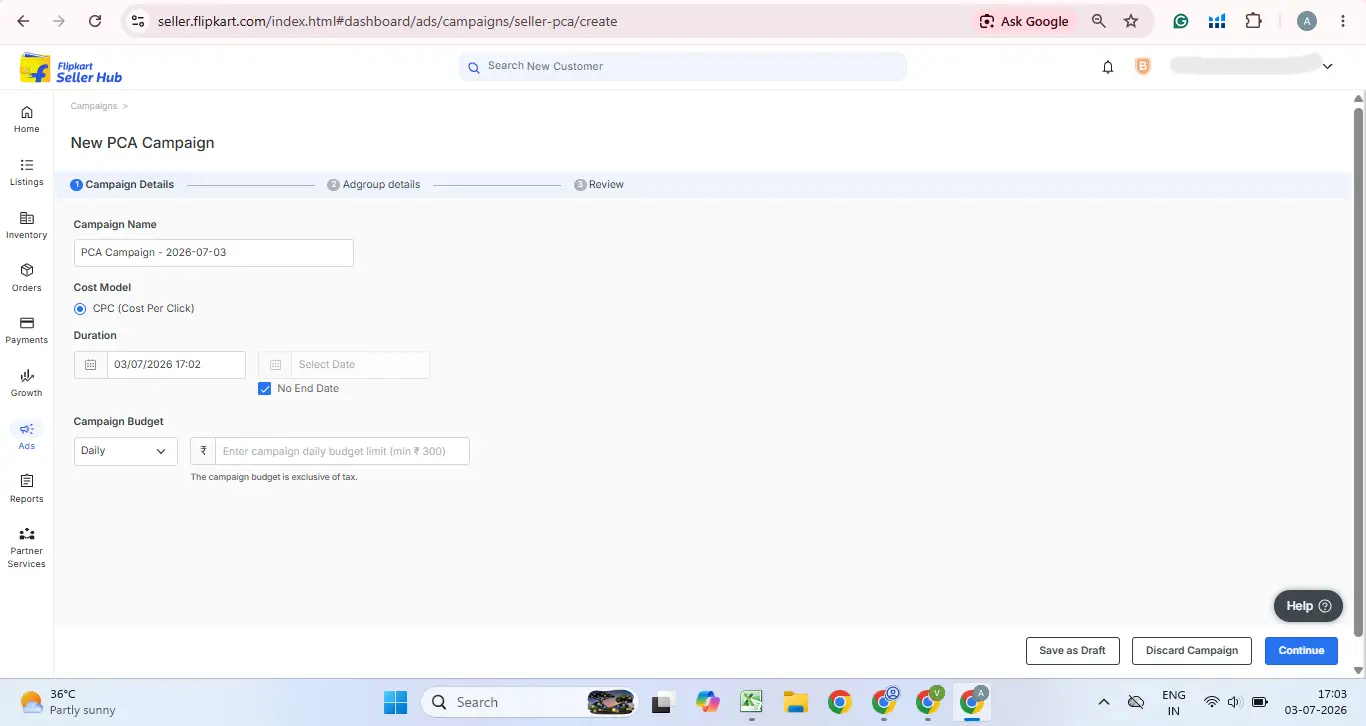
How to Set Up Your First Flipkart Ad Campaign Step by Step
Getting your first campaign live is not complicated. The challenge is setting it up in a way that gives you useful data, rather than just burning budget.
Log in and create the campaign
Log in to your Seller Hub at Seller Hub account Click "Ads" in the left navigation panel. You will see the option to "Create Campaign." Select PLA to start, since this is Flipkart's most accessible format and works for both new and established sellers.
Name your campaign and select products
Give your campaign a clear name. Use a naming convention you can scale, such as "PLA-CPC-ProductName-Month-Year." This matters when you are running ten campaigns and trying to read a dashboard without getting confused. Select the products you want to advertise. You can add up to 2,000 products in one campaign, but for your first campaign, start with your top three to five SKUs by sales volume or margin.
Choose your campaign type
Choose CPC as the campaign type if you are new. Smart ROI is better once your listing has at least 5 to 10 sales per day so the algorithm has data to work with It.
Set your total budget and ROI
Set your Total budget. As noted, Rs. 1000 minimum per campaign if you want actionable data within two weeks. Choose your ROI as average. A sensible starting required ROI is 10 to 12 above Flipkart's suggested ROI to ensure you win enough conversation.
Choose your keyword targeting
Flipkart gives you two options. Auto targeting lets Flipkart choose which searches your ad appears for, which is useful in the first two weeks for discovering which keywords buyers actually use. Manual targeting lets you specify your own keywords using Exact Match or Phrase Match. Run both simultaneously in the first month: one auto campaign to discover terms, one manual campaign with your known high-intent keywords.
Set schedule and launch
Set a campaign end date or leave it open-ended. Open-ended campaigns are fine as long as you review performance weekly. Set a calendar reminder now. Review your settings, confirm your budget, and hit launch. Your ad will be reviewed by Flipkart and typically goes live within a few hours.
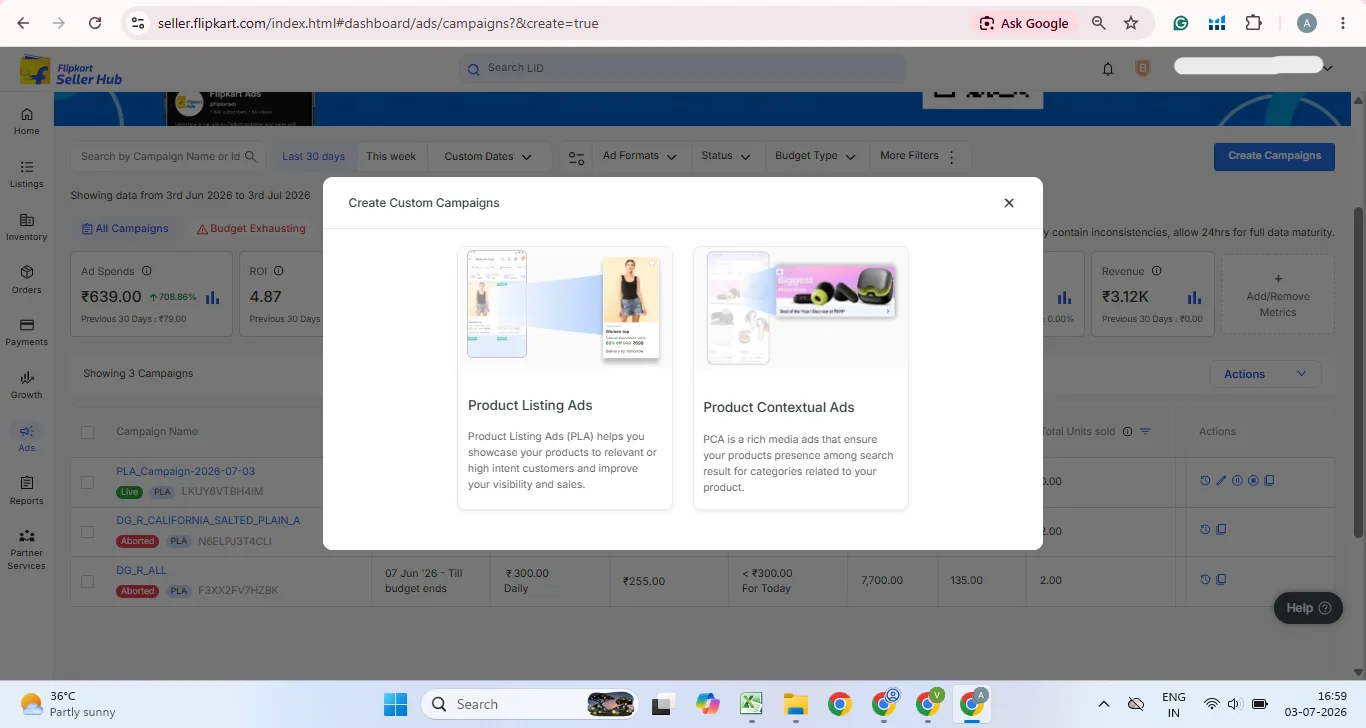
Flipkart PLA vs PCA: Which One Should You Run First
Most sellers who are new to flipkart seller advertising start this question the wrong way. They ask which format is "better" when the right question is which one is right for where your product is in its lifecycle.
Start with PLA. Always. PLA captures buyers who are actively searching for your product type. These are buyers with the highest purchase intent. They have typed a specific query, and your ad appears in front of them at that moment. If you are selling a protein supplement and a buyer searches "whey protein 1kg chocolate," your PLA ad on that keyword is reaching someone who is likely two minutes from making a purchase decision. That is the highest-value placement you can buy on Flipkart.
PCA (or what some sellers call PBA) becomes relevant once your PLA campaigns are stable and generating consistent ROI. PCA is shown on product detail pages of related or competitor products. A buyer looking at a competitor's protein powder might see your PCA ad appearing below their "Add to Cart" button. This is consideration-stage advertising, reaching buyers who are still evaluating options. The conversion rate from PCA is typically lower than from PLA, but the audience is broader and the CPCs are often lower.
A practical split for a seller spending Rs. 2,000 per day: put Rs. 1,500 into PLA targeting your key keywords and Rs. 500 into PCA targeting related category pages. Run this for 30 days, then compare the ROI from each. Scale whichever is delivering better returns.
One thing competitors' guides rarely mention: PCA on Flipkart is mobile-only. Since Flipkart's app accounts for the overwhelming majority of traffic, this is not a major limitation, but it does mean you cannot track PCA performance through desktop-only attribution windows.
How to Choose the Right Keywords for Flipkart Ads
Keyword selection on Flipkart works on the same principle as any search-based platform: match your keywords to the exact phrases buyers use when they have high purchase intent, not just general category terms.
Start by running an auto-targeting PLA campaign for your first two weeks. This is Flipkart's own data on what buyers are actually searching for when products like yours show up. Download the keyword report after two weeks and look at which search terms generated clicks and, more importantly, which ones generated conversions. These are your seed keywords for your manual campaign.
When building your manual keyword list, think in three tiers. The first tier is your core product keywords, the exact phrases that describe what your product is. "cotton formal shirt men blue" or "bamboo floor mat 4x6." The second tier is use-case keywords, the situations where your product solves a problem. "office shirt slim fit," "bathroom anti-slip mat." The third tier is competitor or brand-adjacent keywords. This requires testing because the CPC can be high and conversion rates lower if the buyer is specifically loyal to a competitor.
Use Exact Match for your highest-confidence keywords, those where you know the intent is perfect for your product. Use Phrase Match to discover close variations you have not thought of while still keeping some control over relevance. Add negative keywords from day one. If you are selling premium leather bags and the word "cheap" appears in search terms driving clicks, add "cheap" as a negative keyword immediately.
You can add up to 200 keywords per PLA campaign on Flipkart. Do not use all 200 from day one. Start with 20 to 30 tightly focused keywords, assess performance weekly, and add more only when you have enough budget to gather data across all of them. Too many keywords on a small budget means none of them get enough impressions to be measurable.
Use our marketplace calculator tools to check your per-unit margins before deciding how aggressively to bid on competitive keywords.
Flipkart Ad Bidding Strategy: How to Win Without Overspending
Bidding on Flipkart is not about paying the most. It is about paying the right amount for the right keyword at the right placement. Here is how to think about it practically.
Start by looking at Flipkart's suggested bid for each keyword when you set up your campaign. This suggested bid is Flipkart's estimate of what it takes to win impressions. Set your opening bids at 10 to 15% above the suggestion. This gets you into the auction with enough headroom to win impressions without massively overpaying.
After two weeks, look at your impression share. If a keyword is getting fewer than 50 impressions per week, your bid is likely too low or your listing quality score is pulling your ad rank down. For keywords where you are getting impressions but fewer than 1% CTR, the issue is usually your product image or price compared to competitors, not the bid.
Placement-level bidding is one of the most underused features in Flipkart ad campaigns. You can set different bids for the Top of Search placement versus other placements. Top of Search is the most expensive slot but also the highest-converting. Start by bidding 30 to 50% more for Top of Search on your three to five highest-margin products. For product page and browse placements, bid at or slightly below the suggested rate since these placements have lower purchase intent.
During festive periods like Big Billion Days, CPCs can spike 2x to 3x their normal levels as competition intensifies. Budget for this by increasing your daily budget ceiling two weeks before the sale begins, not on the day itself. By the time the sale starts, your campaign history and quality score are already established and you will win placements more efficiently than sellers who enter the auction cold on sale day.
Sellers who spend Rs. 15,000 or more per month on Flipkart ads should review bids at minimum weekly, not monthly. Flipkart's competitive landscape shifts fast, especially in electronics and fashion.
How to Read Your Flipkart Ad Reports and What to Optimise
Flipkart updates its ad reports three times a day and makes the following report types available in your Seller Hub: a seller-level consolidated report, an FSN-level (product-level) report, a placement report showing performance by ad position, and a keyword report showing which search terms are driving spend and sales.
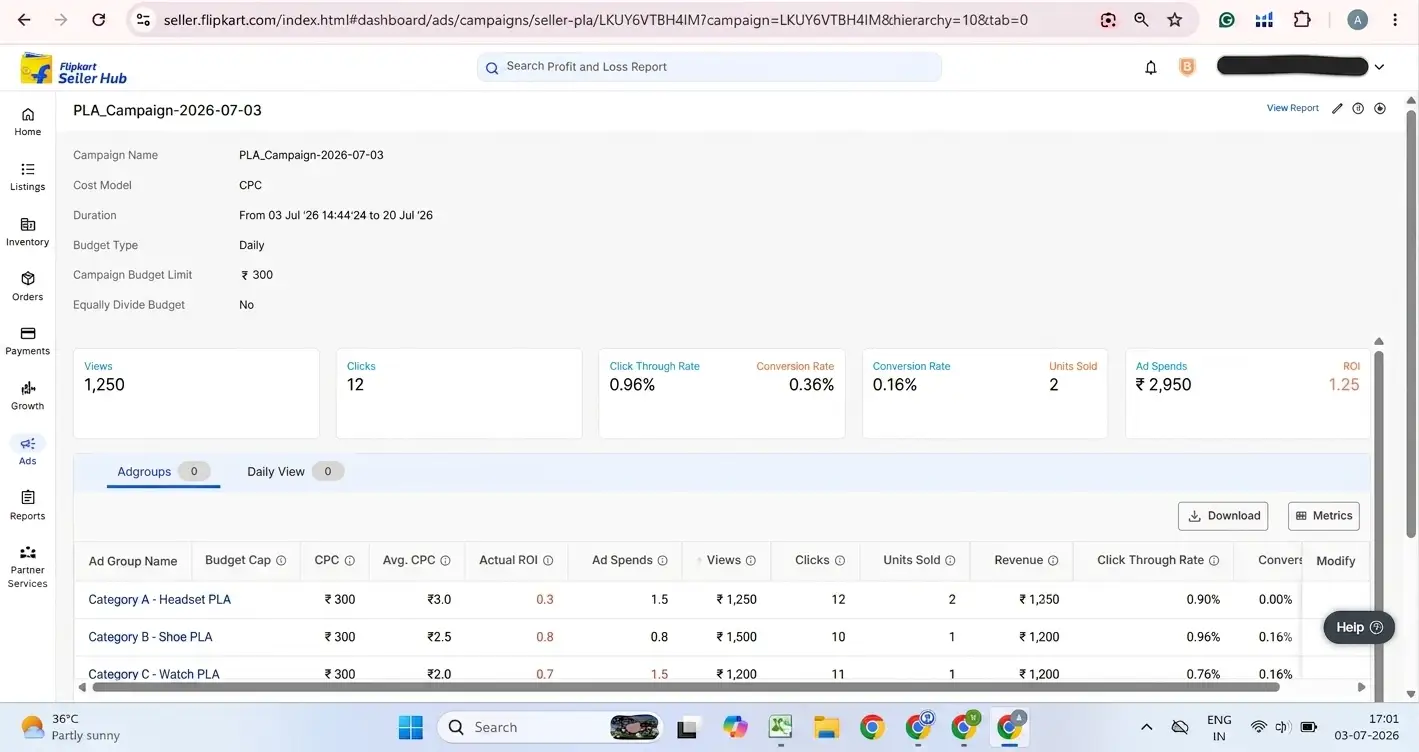
Start with the keyword report. This is the most actionable. Look at cost, clicks, revenue, and ROI for each keyword. Sort by spend, highest to lowest. Your biggest spenders should also be your best converters. If a keyword is consuming 20% of your budget but delivering an ROI of 1x or below, pause it and redirect that budget to your top performers.
The placement report tells you which positions your ads are winning and what each position is costing. If your Top of Search placements are converting at 5x ROI and your product page placements are at 1.5x, consider setting a lower bid cap on product page placements to reduce wasted spend.
The FSN (Flipkart Serial Number) report shows performance by individual product. This is where you identify which specific SKUs your ad spend is going to and which ones are actually converting. Not every product in a multi-product campaign performs equally. Pause the low performers and increase budget allocation to the top three.
Track these metrics weekly:
CTR below 2% signals a problem with your product image, title, or price positioning relative to what buyers see in search results. Fix the listing before increasing bids.
ROI below 3x for more than 30 days signals a keyword relevance issue, a listing quality issue, or a pricing problem. Investigate before adding budget.
Impression share below 20% for your best keywords means you are losing auctions. Either increase your bid or improve your listing quality score.
In our experience managing Flipkart accounts at Global Websters, the biggest waste we find in inherited accounts is sellers paying for hundreds of irrelevant search terms because no one built a negative keyword list. Building that list from week one saves 15 to 25% of budget immediately.
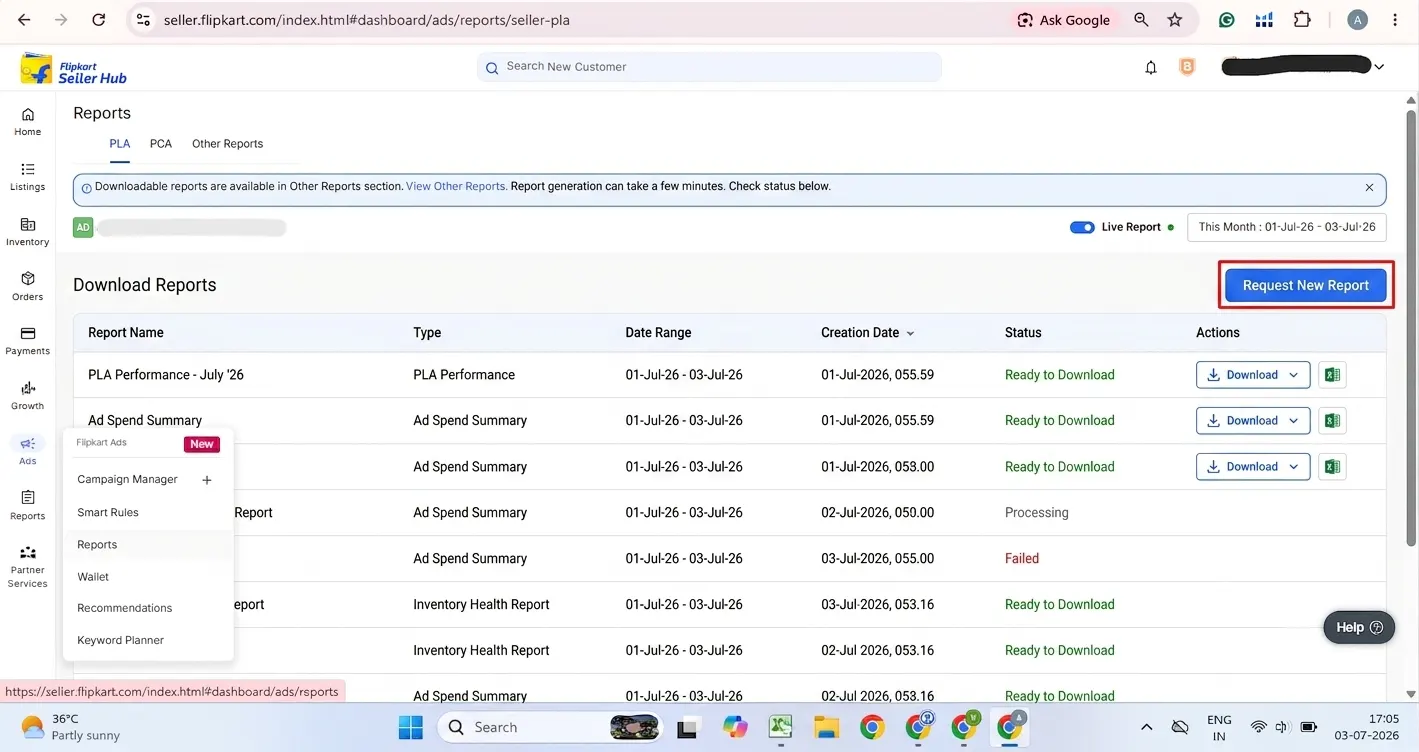
Managing Flipkart ads alongside catalogue updates, returns, and account health is a significant workload. If you want expert support, see our Flipkart seller account management service.
Common Flipkart Advertising Mistakes That Waste Your Budget
The most expensive mistake is also the most common: running ads before the listing is ready. A listing with two images, no reviews, and a vague title will lose ad auctions to competitors with superior listings even when you bid higher. Flipkart's quality score factor in listing completeness and historical conversion rate. Build the listing first, get at least 15 reviews if possible, then run ads.
Second most common: setting campaigns live and not checking them for weeks. Flipkart's competitive environment changes constantly. A keyword that was delivering 6x ROI in January may be at 2x by March if three new competitors entered the auction. Weekly review is not optional; it is the minimum cadence for maintaining efficiency.
Many sellers also spread their budget too thin. Running ten campaigns at Rs. 200 per day each means none of them generate enough data to optimise. Concentrate the same Rs. 2,000 into two well-built campaigns and you will have usable data within a week.
Not using negative keywords is money left burning. Auto-targeting campaigns will serve your ads to buyers searching for loosely related queries that have nothing to do with your product. If you sell a "wooden serving tray," your ad might show up for "serving tray plastic cheap" unless you add negative terms like "plastic" and "cheap." Flipkart allows up to 200 exclude keywords per campaign. Check your search term reports every week and add negatives systematically.
Pausing campaigns the moment ROI dips is another common error. Flipkart's algorithm needs at least 30 days to learn a new campaign's conversion patterns. Sellers who pause campaigns at day 10 because the ROI is "only 2x" never give the system the data it needs to improve. Unless you are burning through budget with zero conversions, let campaigns run their learning period.
Finally, sellers running ads during the Big Billion Days often forget to check inventory levels. Nothing wastes ad spend more completely than a campaign running at full budget on a product that is out of stock.
Flipkart Ads for New Sellers vs Established Sellers
New sellers and established sellers need entirely different ad strategies on Flipkart. Treating them the same is a mistake that most guides skip over.
If you have been selling on Flipkart for less than 90 days or your listings have fewer than 25 sales each, your focus should be on three things. First, pick one to five products maximum to advertise. Do not spread budget across your entire catalogue. Second, use PLA campaigns with auto-targeting to discover which search terms buyers actually use for your product type, then build a Phrase and Exact Match keyword list from that data. Third, accept that your ROI will stay below 3x for the first month while Flipkart's algorithm learns your listing's conversion rate. This is the cost of building conversion history.
New products with zero sales get no Usual Price from Flipkart for the first 15 days, which means no discounts or promotional pricing can be applied. Running ads on new listings in this window is often the only way to generate initial traffic and the first few reviews. The cost per sale will be high, but those early reviews are what unlock better organic ranking and lower your future ad costs.
For established sellers with 100 or more sales per SKU and healthy review scores, the strategy shifts. You should be running both PLA and PCA simultaneously, reviewing bids weekly, using Smart ROI for your proven top sellers, and building a negative keyword list that grows every week. At this stage, the goal is not discovery but defence. You are protecting your organic ranking, maintaining share of voice on high-intent keywords, and using ads to push seasonal and slow-moving inventory.
Established sellers should also look at placement-level bidding more carefully. If your product already ranks organically in the top five for its main keyword, you may not need to pay premium bids for Top of Search on that term. Redirect that budget to keywords where you rank poorly organically.
If you are at the established seller stage and want a dedicated team managing your PLA, PCA and Smart ROI campaigns alongside your full account, see our marketplace management services to understand how we work.
Frequently Asked Questions
What to Do Next
If you have read this far and your Flipkart listings are already live and in-stock, the next step is simple. Open your Seller Hub, go to Ads, and create your first PLA CPC campaign on your top two products by sales volume. Set a daily budget of Rs. 300 to Rs. 500 per product, run auto-targeting for the first 14 days, and download your search term report on day 15. That report will tell you exactly which queries buyers are using to find your products and which are wasting your budget. Build your manual Exact Match and Phrase Match keyword campaign from that data. That single step of running auto-targeting first and reading the data before switching to manual targeting will give you a meaningful head start over the majority of sellers who begin with guesswork and wonder why their ROI never improves.
Want a Team Running Your Flipkart Ads Every Week?
We manage PLA, PCA, Smart ROI and Display campaigns end-to-end for Flipkart sellers, alongside catalogue, pricing and account health. See our Flipkart seller account management service to get started.